If the MerchIntel Dashboard is your 30,000-foot view of the market, then Merch Research is where you roll up your sleeves and get to work. This is the feature serious Merch by Amazon sellers spend the most time in - and for good reason. With access to 300M+ designs, real-time BSR tracking, and intelligent filtering, Merch Research gives you the raw intelligence you need to make confident, data-driven decisions about what to design next. Whether you are hunting for a fresh niche, validating a design concept, or reverse-engineering what makes a competitor's shirt sell, this is your primary workspace.
Think of it this way: guessing what will sell on Amazon is a losing game. But researching what is already selling - and understanding why - gives you a repeatable edge. Let's walk through every section of Merch Research so you can use it like a pro from day one.
Trending Designs: Your Starting Point
Before you type a single keyword, take a moment to look at what is trending right now. The top section of Merch Research surfaces the designs with the fastest sales growth rate and the most customer attention at this very moment. This is a goldmine, especially if you are early in your MBA journey and still figuring out which niches to enter.
Trending designs tell you a few important things at a glance: what themes are resonating with buyers right now, which styles are moving, and what price points are performing. You do not need a business idea to get value here - the trends themselves will often inspire one. Scroll through the carousel below to see examples of what the trending section looks like in practice.
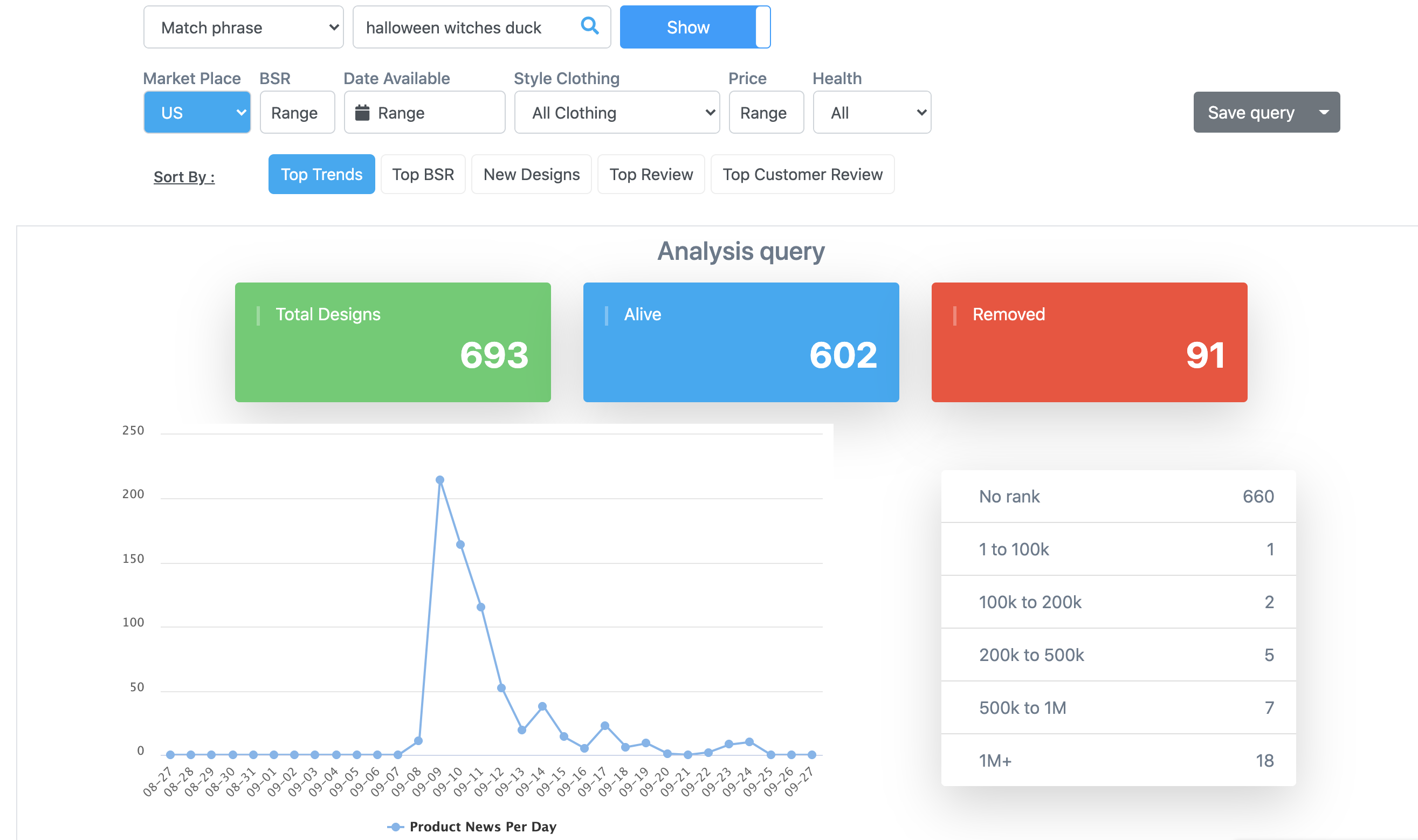
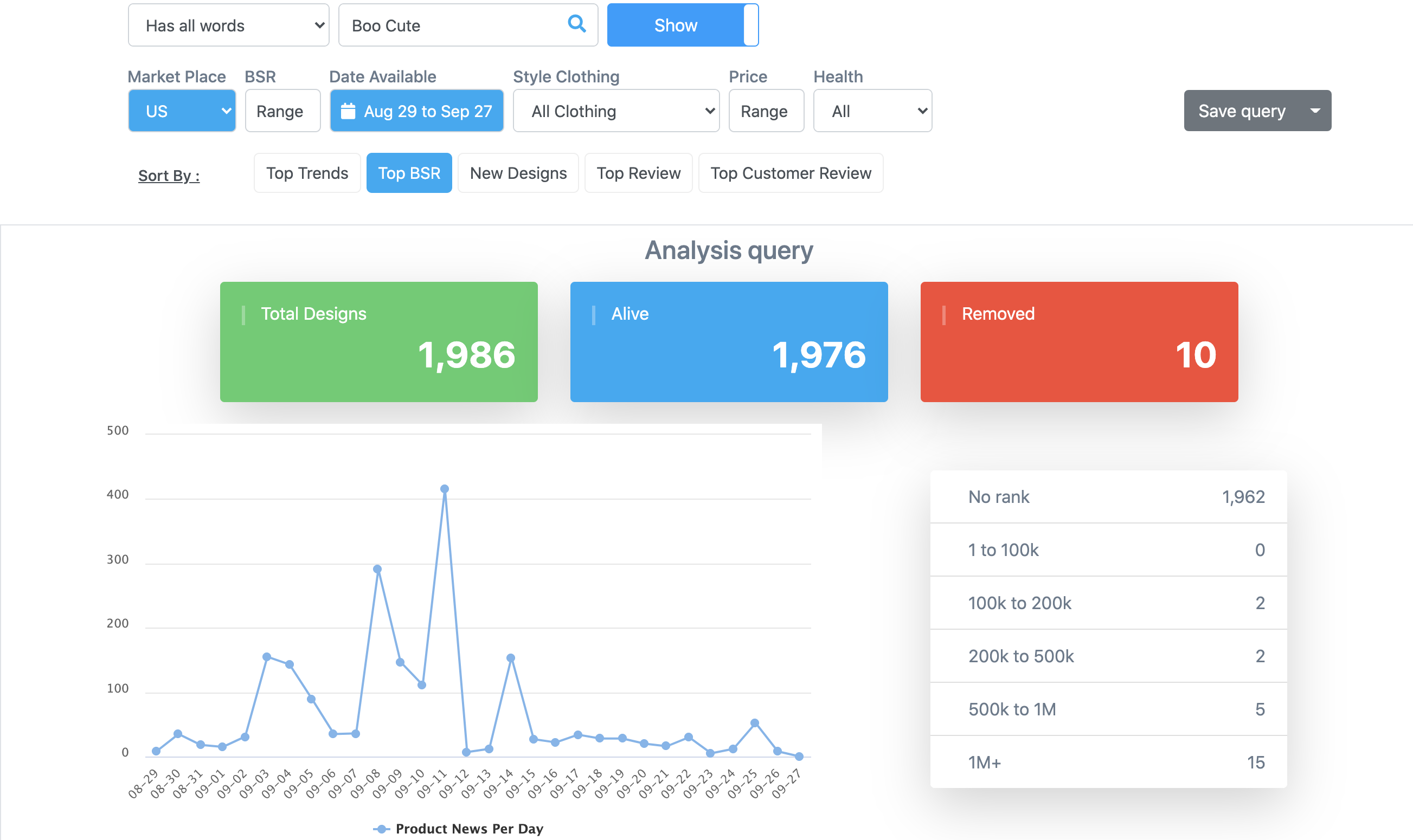
A smart habit is to check the trending section at the start of every research session. Markets shift quickly. A holiday, a pop-culture moment, or a seasonal event can send a niche soaring in 48 hours. The sellers who catch these waves early - before they peak - consistently outperform those who react late.
How to Search: Find Any Design in Seconds
The search tool in Merch Research is deceptively powerful. On the surface it looks like a simple search box, but underneath it gives you four distinct search modes that dramatically affect the quality of your results:
- Has all words - returns designs containing every word in your query, regardless of order. Best for broad niche exploration (e.g., "camping dad funny").
- At least one - returns designs containing any of your keywords. Useful when you want to cast a wider net across related terms.
- Occur in same order - matches your keywords appearing consecutively in that exact sequence. Great for finding designs with a specific phrase structure.
- Match phrase - the strictest mode; finds exact phrase matches. Use this when you know the precise title or tagline you are looking for.
You can search by ASIN, title, brand name, or keyword. If you have a design idea but are not sure what keywords to use, MerchIntel also surfaces recommended keywords based on market trends - a useful shortcut when you are starting from scratch.
Understanding Analytics Charts
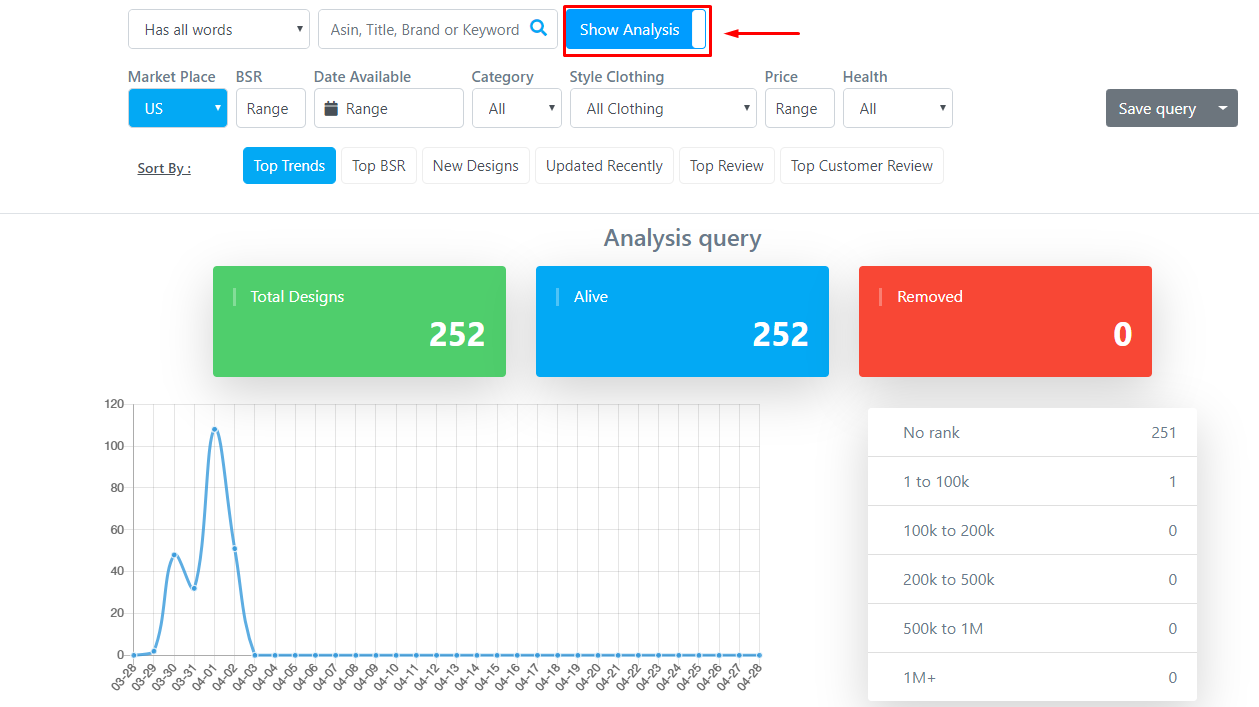
Toggle on the Analysis Chart button during any search and you get a live data layer on top of your results. This chart tracks market-level metrics over a time period you define - by default, the last 30 days.
The Analytic Query section breaks down four key metrics:
Total designs: The total number of designs uploaded within the selected date range. Rising upload numbers often signal growing seller interest in a niche - which means increasing competition, but also confirmed demand.
Alive: Designs that still exist and are active on Amazon as of today. A high alive count suggests stable demand and relatively low removal rates in that niche.
Removed: Designs pulled from Amazon within the date range. A spike in removals can indicate trademark enforcement activity, policy violations, or a niche that Amazon is cleaning up. This is an early warning signal worth paying attention to.
Rank: The distribution of designs by BSR (Best Seller Rank) within your search results, plus how many designs remain unranked. A healthy niche will show a mix of ranked designs - too many unranked products can signal weak demand.
Chart: A timeline view of new product uploads versus overall market activity within your selected period. Use this to spot seasonality patterns - for example, a niche that spikes every October is likely Halloween-adjacent, which tells you when to have your designs ready.
To change the time window, use the Date Available filter. Zooming out to 6-12 months gives you a clearer picture of long-term trends rather than short-term noise.
Advanced Filters: Narrow Down Your Research
Raw search results across 300M+ designs can be overwhelming. Advanced Filters are how you narrow the field to exactly what matters for your strategy. Here is what each filter does and why it matters:
Market - Choose from US, UK, or DE (Germany). This is critical because consumer preferences differ significantly by region. A phrase that converts well in the US may not resonate in Germany. If you are targeting a specific market, always filter to that market first before drawing any conclusions.
BSR (Best Seller Rank) - This is one of the most important filters in your toolkit. BSR tells you how well a product is currently selling relative to everything else in its category. A lower BSR means stronger sales. Use this filter strategically: searching BSR 1-100,000 finds proven bestsellers. Searching BSR 100,000-500,000 finds designs with some traction but less competition pressure - often the sweet spot for new sellers who cannot yet compete at the very top.
Date Available - The date the design first appeared on Amazon. Use this to find brand-new designs (great for spotting emerging trends early) or to restrict results to products that have had time to accumulate ranking history.
Style - Filter by garment type: standard t-shirt, premium t-shirt, sweatshirt, hoodie, tank top, and more. Understanding which styles perform in your niche matters. Some niches (fitness, outdoor) convert well on tanks and performance shirts. Others (gift niches, seasonal) tend to stick to standard tees. Filter to the style you plan to produce so your research stays relevant.
Price - Analyzing the price range of successful designs in a niche gives you a benchmark for your own pricing decisions. If every top-selling shirt in a niche is priced between $19.99 and $24.99, pricing yours at $27.99 without a strong differentiator is a risk. This filter helps you understand the pricing norms before you list.
Health - Filter by "Alive" (currently active listings) or "Removed" (delisted products). Filtering for alive designs gives you a picture of what is currently viable. Filtering for removed designs, however, is a surprisingly useful research angle - it can reveal niches where trademark enforcement is heavy, which is a risk flag you want to know about before you invest time designing.

Sort Options: Surface the Best Results
Once your filters are set, Sort Options let you reorder results to match your specific research goal. Each sort mode tells a different story:
- Top Trend - Ranks results by fastest BSR growth rate. Use this when you want to find what is gaining momentum right now. Ideal for catching trends before they peak.
- Top BSR - Ranks by lowest BSR (best sales performance). Use this when you want to see the proven market leaders in a niche.
- New Designs - Surfaces the most recently uploaded designs first. Use this when you want to monitor what new sellers are entering a niche with.
- Updated Recently - Shows designs that were most recently updated. Sellers sometimes update titles or descriptions to optimize performance; tracking updates can reveal active, optimized listings.
- Top Review - Ranks by highest average star rating. Quality signal: high-rated designs in a niche tell you what buyers consider excellent.
- Top Customer Review - Ranks by total number of reviews. High review counts signal consistent sales over time - these are the long-term winners in a niche.

A practical workflow: run Top Trend first to spot what is heating up, then switch to Top BSR to see the established leaders, then sort by New Designs to check if the niche is getting crowded with fresh entries. Together, these three views give you a complete picture of niche health and timing.
Reading Search Results Like a Pro
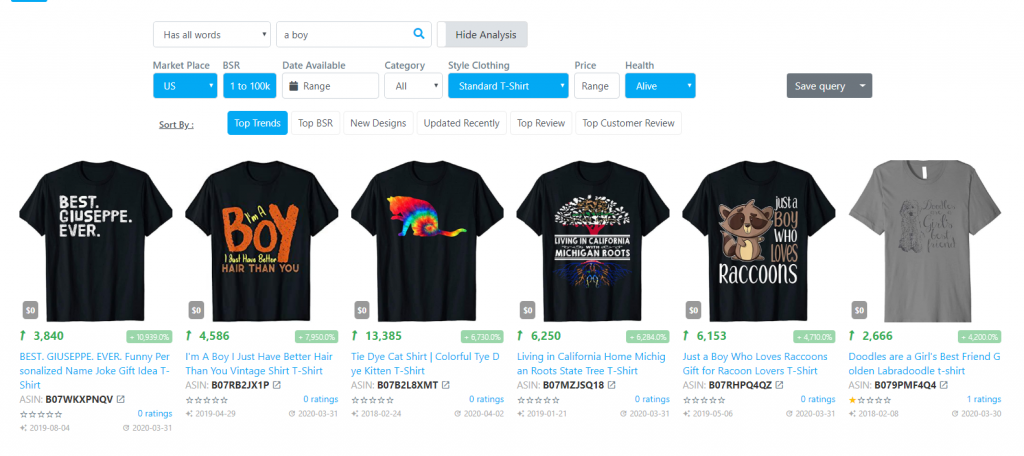
With your filters and sort options dialed in, MerchIntel returns a results grid where each card shows you the most actionable data points at a glance. Here is how to read each parameter:
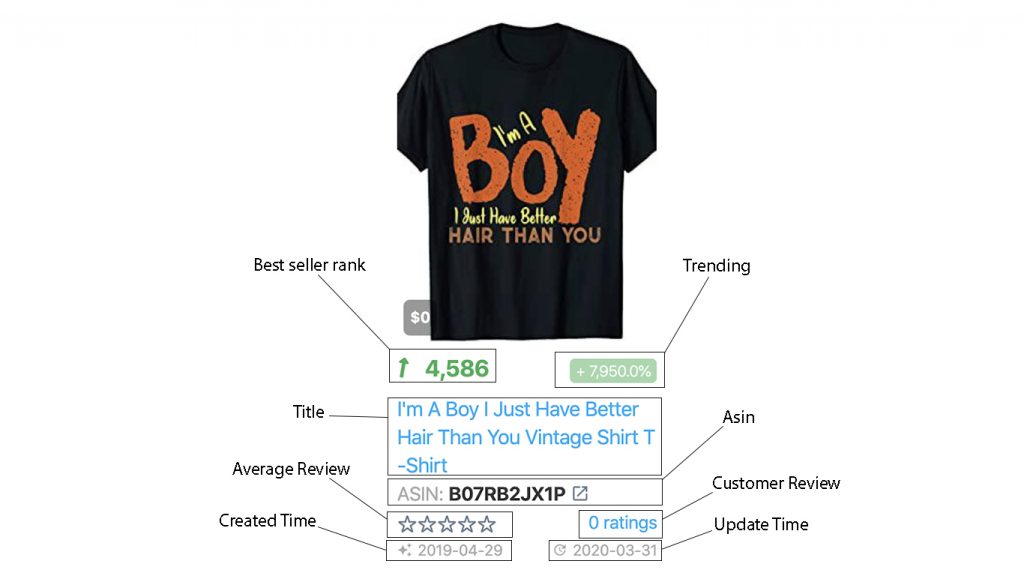
Understanding each parameter:
Best Seller Rank (BSR): The smaller the number, the better the product is selling. A shirt ranked #3,000 is outselling one ranked #300,000 by a significant margin. BSR fluctuates daily, so what you see is a snapshot - but a consistently low BSR over time is the most reliable signal of genuine demand.
Trending: Expressed as a percentage, this shows BSR growth compared to the previous day. A +5,000% trending figure sounds dramatic, but it can simply mean a product jumped from BSR 500,000 to 10,000 overnight - which is actually very meaningful. High positive trending on a design with a good BSR is a strong buy signal for your research list.
Title: Read titles carefully. Successful sellers craft titles that balance keyword richness with readability. Notice patterns: do top-selling shirts in this niche use a specific phrase structure? Are they naming a profession, a hobby, a relationship? The title formula is often as important as the design itself.
ASIN: The Amazon Standard Identification Number. Click it to open the live Amazon listing in a new tab. This lets you see the full product page, all color variants, customer Q&A, and the real-time price - context that completes your research picture.
Average Review: The star rating average. Useful for understanding whether buyers in this niche are generally satisfied with what they are buying - a quality baseline for the niche overall.
Customer Review: Total number of reviews. High review counts mean consistent sales over a sustained period. A design with 200+ reviews has proven itself. Use this alongside BSR to identify long-term performers versus one-hit wonders.
Created time and Update time: The upload date and the most recent update date. A design uploaded 3 years ago that still holds a strong BSR is a proven evergreen product - strong evidence of durable demand in that niche. A recently uploaded design that already has a low BSR is an early mover signal worth investigating further.
Product Detail: Deep Dive Analysis
Every result card is clickable. When you click into a design, you get the full product detail view - a deeper layer of analysis that is worth opening on any design that catches your eye.
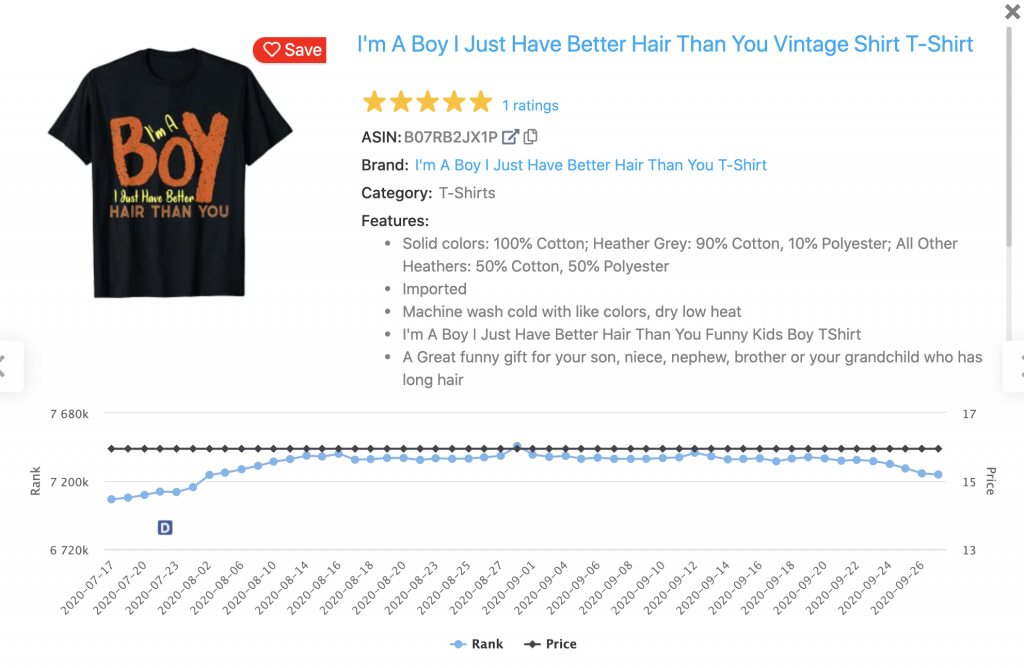
The detail view includes two charts that tell different stories. The price chart tends to be relatively stable - most sellers set a price and stick with it. When you do see a price change, it often indicates a seller testing a new price point or responding to competitive pressure. The rank chart is where things get interesting. BSR fluctuates constantly, and the rank chart shows you the full trajectory of a design's performance over time.
A rank chart that trends steadily downward (improving BSR) over months is the hallmark of a genuinely strong evergreen design - demand is consistent and growing. A rank chart that shows spikes followed by sharp drops is a seasonal product - it surges around a specific event or holiday and then falls away. Both are valid niches, but they require different strategies. Evergreen niches need long-term catalog building; seasonal niches need precise timing and high-volume output before the season peaks.
Pro Tips for Effective Research
Knowing the features is one thing. Using them efficiently is another. Here are practical workflow habits that experienced sellers develop over time:
Start broad, narrow deliberately. Begin with a general keyword and a wide BSR range to understand the overall shape of a niche. Then progressively add filters - market, style, health - to zoom in on the specific opportunity you want to pursue.
Cross-reference with keyword research. When you find a design with strong BSR, open the ASIN on Amazon and examine the listing title and bullet points for keyword patterns. Then take those keywords back into Merch Research keyword tools to validate search volume. Design and keyword research are most powerful when done together.
Save promising designs to Favorites. As you research, you will find designs worth monitoring over time. Use MerchIntel's Favorites feature to bookmark them and track how their BSR and trending figures evolve week over week.
Document your findings. Research sessions generate insights fast. Write down niche ideas, keyword patterns, and pricing observations immediately using MerchIntel Notes - do not rely on memory alone.
Time your research well. Run competitor research 6-8 weeks before a major holiday or seasonal event. By the time you finish designing, getting approved, and listing, you want to be live before the search volume peaks - not after it has already crested.
Key Takeaways
- Merch Research gives you access to 300M+ designs with real-time BSR data, trending analysis, and deep filtering.
- Use the four search modes strategically: match phrase for precision, has all words for broad exploration.
- Advanced Filters - especially BSR range, market, and health status - are your primary tools for separating signal from noise.
- Read BSR and Trending together: a low BSR combined with strong positive trending is the most reliable indicator of a winning design.
- The product detail rank chart reveals whether a niche is evergreen or seasonal, which directly shapes your strategy.
- Always combine design research with keyword research and note-taking for a complete research workflow.
Ready to put this into practice? Start your 14-day free trial of MerchIntel and run your first Merch Research session today. The database of 300M+ designs is waiting - and so is your next winning niche.