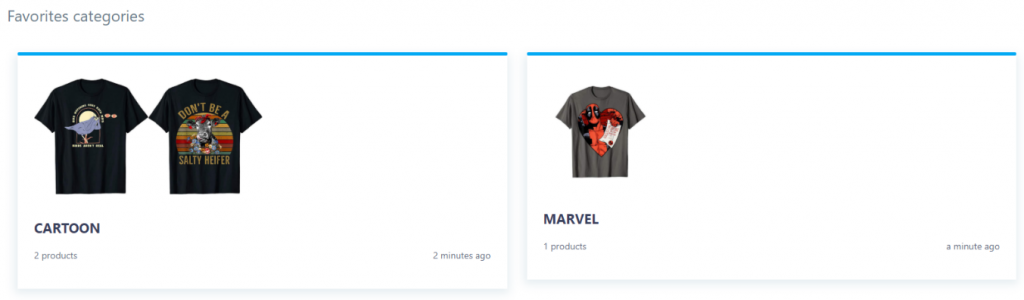
You are deep in a research session. You have browsed hundreds of Merch by Amazon designs, spotted several that gave you a great idea for a new niche, and mentally noted a few that nailed exactly the style you want to replicate. Then you close the tab - and it is all gone. Sound familiar? Every MBA seller has lost a brilliant design reference this way. The MerchIntel Favorites feature exists to solve exactly this problem. It is your personal design library, always organized, always accessible, and built to support both solo sellers and teams.
Why Organizing Your Research Matters
Most MBA sellers underestimate how much time they waste on disorganized research. You find a great design, move on, then spend twenty minutes later trying to hunt it down again - searching the same keywords, scrolling through hundreds of results, hoping you recognize it when you see it. Multiply that by dozens of research sessions per month and you are losing hours of productive time.
Disorganized research also leads to missed opportunities. When you are ready to brief a designer or sit down to create a new shirt, having a curated reference library means you can move immediately. Without it, you are starting from scratch every single time - redoing work you have already done.
There is also a quality issue. When your references live only in your memory or scattered across browser bookmarks, you lose the ability to compare and evaluate systematically. A well-organized Favorites library lets you look at ten strong designs side by side and identify patterns: what typography works in this niche, what color palettes are selling, what phrases are resonating with buyers right now.
MerchIntel Favorites turns your research sessions into a cumulative, growing asset rather than disposable work that evaporates when you close the browser.
How to Save Designs to Favorites
Saving a design to your Favorites is intentionally fast - because friction in the saving step means you will skip it and lose the reference.
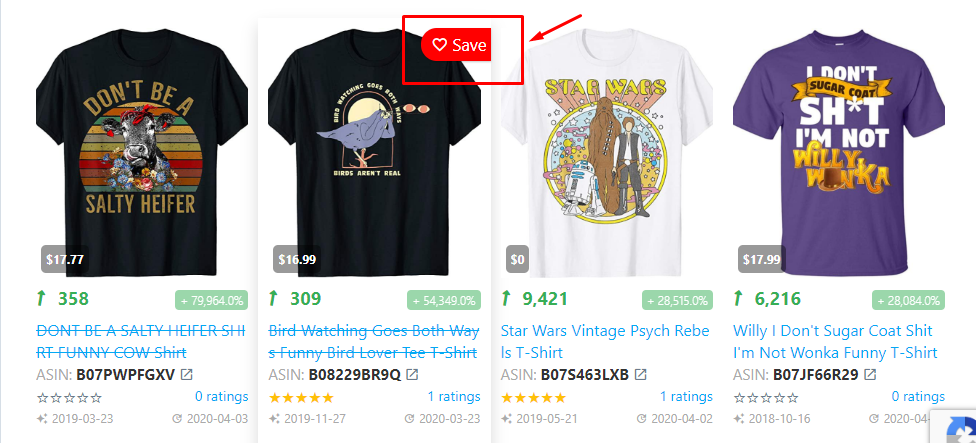
While browsing designs anywhere in MerchIntel, hover over any product. A heart icon will appear next to the design. Click it. The design is immediately saved to your Favorites. There is no confirmation screen, no form to fill out - just one click and it is captured.
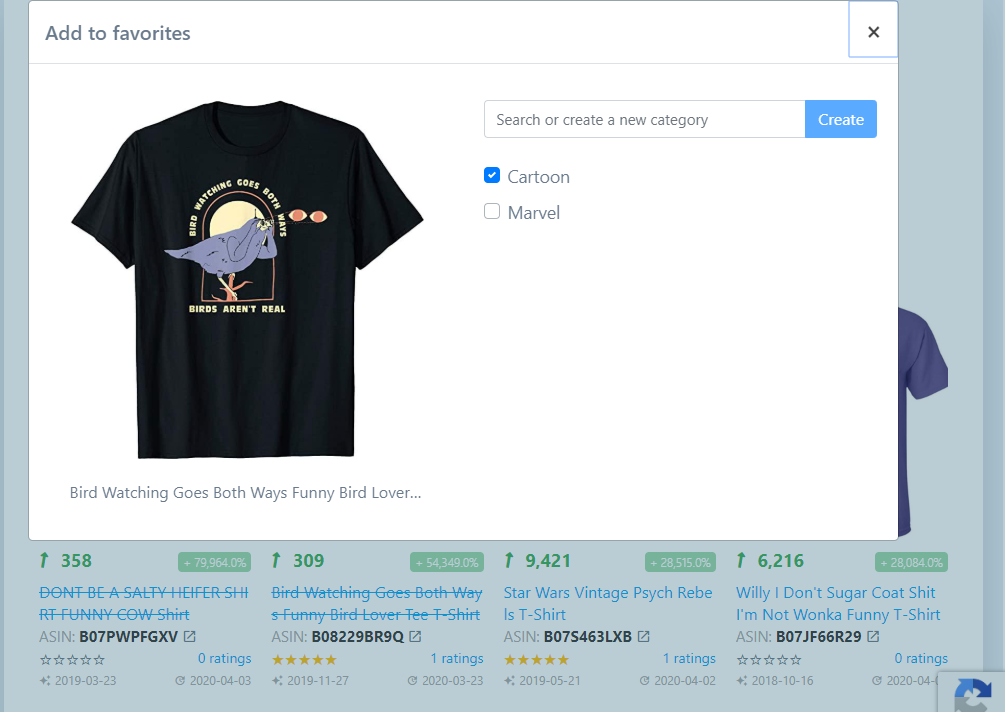
After saving, MerchIntel gives you a prompt to assign the design to an existing album or create a new one on the spot. This is the step most new users skip - do not skip it. Assigning designs to albums at the moment of saving takes five extra seconds and saves you significant reorganization time later.
If you saved a design without assigning it to an album, you can still do this from your Favorites page. Go to the Favorites section, find the unorganized design, and move it to the appropriate album. It is a small habit that pays off enormously as your library grows.
Pro tip: set a rule for yourself - never save a design without at least assigning it to a niche category album. Even a broad category like "dog niche" or "funny quotes" is better than an uncategorized pile. You can always refine the organization later.
Organizing with Albums and Categories
Albums are the backbone of your Favorites system. They let you group designs by whatever logic makes sense for your business - and the right grouping strategy can dramatically improve how fast you move from research to execution.
The most effective album structures experienced sellers use:
By niche: Create one album per niche you are researching or actively selling in - "nurse gifts," "hiking lifestyle," "dog mom." This is the most common structure and works well if you focus on several distinct niches.
By design style: Albums like "minimalist text only," "vintage badge style," "watercolor illustration" help you quickly find references when you are briefing a designer or exploring a new visual direction.
By keyword theme: If you are doing deep keyword research for a specific term, a dedicated album keeps all related designs in one place. This pairs naturally with the MerchIntel keyword research workflow.
By seasonal campaign: Create albums for upcoming holidays or events - "Christmas 2024," "Mother's Day ideas," "Back to School." When the season approaches, your research is already done.
By competitor or quality benchmark: Some sellers keep an album of the best-in-class designs they have ever seen on MBA - not to copy, but as a quality reference point to benchmark their own work against.
You can create as many albums as you need, rename them at any time, and move designs between albums freely. The system is flexible enough to evolve as your research strategy matures.
Collaborating with Your Team
If you work with a designer, a virtual assistant, or a business partner, the Favorites feature has a collaboration dimension that changes how teams work together on MBA research.
Shared albums let multiple team members access, view, and add to the same collection of designs. This eliminates the back-and-forth of sending screenshots in messaging apps or maintaining a shared Google Doc with image links that break over time.
Here is a practical team workflow: the researcher (you or a VA) browses MerchIntel and saves strong designs into a shared album called "Designer Brief - This Week." Your designer opens the same album, reviews the references, and has everything needed to understand the style direction, niche context, and competitive landscape before starting work. No lengthy briefing calls required.
Shared albums also create accountability. When everyone on the team is adding to and organizing the same library, the quality of the research improves because multiple people are filtering what goes in. Strong designs get saved; weak ones get passed over.
For solo sellers who plan to hire help in the future, building well-organized Favorites albums now means your future VA or designer can onboard into your research process with almost no handholding.
Best Practices for Using Favorites
Building the habit is more important than the tool itself. Here are the practices that separate sellers who get real value from Favorites and those who rarely use it:
Create your album structure before your next research session. Spend ten minutes setting up the album categories that match your current niches and research goals. Having the albums ready means you will actually use them.
Review your Favorites weekly. Schedule a short weekly review - fifteen to twenty minutes - where you go through recent saves, clean up any uncategorized designs, and pull out the best references for your upcoming design briefs. This keeps your library current and actionable.
Combine Favorites with Notes. When you save a design that inspires a specific idea, open the Notes feature and write down the thought immediately. A design reference with a written note attached - "use this typography style but for a hiking niche instead" - is far more valuable than a silent image reference weeks later when you have forgotten the context.
Delete what no longer serves you. It is tempting to save everything, but a bloated Favorites library is almost as useless as no library at all. If a niche is no longer relevant to your business, archive or delete those albums. Keep your library lean and purposeful.
Use Favorites to track competitors over time. If you regularly save designs from specific top sellers in your niches, you build a timeline view of how their catalog evolves. This is informal but effective competitive intelligence.
Key Takeaways
- MerchIntel Favorites solves the most common MBA research problem - losing great design references because there was no system to capture them
- Saving a design takes one click; the heart icon appears on hover anywhere in the platform
- Albums let you organize by niche, style, keyword, season, or any structure that fits your workflow
- Shared albums enable genuine team collaboration without the friction of external file sharing
- Weekly Favorites reviews keep your library actionable and prevent it from becoming a cluttered archive
- Combining Favorites with the Notes feature creates a complete research documentation system
If you have not set up your Favorites albums yet, your next research session is the perfect time to start. Try MerchIntel free for 14 days and build a design research library that actually makes your business faster.