You spent hours designing the perfect t-shirt. The niche is hot. The keywords are on point. You upload it to Merch by Amazon - and two days later, you get a takedown notice. Then another. Then you log in one morning and your account is gone.
This is not a hypothetical. It happens to MBA sellers every single week, and the cause is almost always the same: an unintentional trademark violation. A trending phrase that turned out to be registered. A movie quote that seemed harmless. A band name slipped into a keyword field. One mistake like this can erase months of work and thousands of dollars in passive income overnight.
The good news? It is entirely preventable. And with the right process, you can upload with confidence every single time.
Why Trademark Checking Matters for MBA Sellers
Amazon's intellectual property policy is strict, and it gets stricter every year. When a trademark holder files a complaint, Amazon acts fast - typically removing the listing within hours and logging a strike against your account.
Here is why this matters more than most sellers realize:
Account strikes lead to tier demotion. If you are at tier 500 and accumulate enough IP violations, Amazon can demote you back to tier 25. That means losing your upload slots - one of the most valuable things an MBA seller has.
Repeat violations lead to permanent bans. Amazon does not always give warnings. Some sellers have reported being banned after just two or three confirmed violations. A permanently banned account cannot be reinstated, and the passive income you built disappears entirely.
Ignorance is not a defense. Amazon does not care whether you knew a phrase was trademarked. If the trademark holder files a valid complaint, your listing comes down. Period.
Trending topics are the highest risk zone. The phrases that perform best on MBA - viral sayings, pop culture references, seasonal catchphrases - are often exactly the ones most likely to be trademarked. Riding trends without checking is like running a red light every morning and hoping nothing happens.
Studies from IP monitoring firms have consistently shown that consumer goods categories, which include print-on-demand apparel, account for a disproportionate share of trademark disputes on Amazon. The volume of complaints has grown year over year as brand enforcement tools have become more accessible to trademark holders.
How to Check Trademarks with MerchIntel
MerchIntel's trademark checker is built specifically for the MBA workflow. It is not a generic IP search tool - it is designed around the phrases, niches, and patterns that MBA sellers actually encounter.
Here is how to use it step by step.
Step 1: Navigate to the Trademark feature. In your MerchIntel dashboard, find the Trademark section. It is separate from the design research tools, which keeps your compliance workflow clean and focused.
Step 2: Enter your phrase in the search box. Type the exact text you plan to use in your product title or bullet points. Be precise - trademark searches are case-sensitive in some contexts, and slight variations can return very different results.
Step 3: Review the results carefully. MerchIntel will show you whether the phrase has active trademark registrations, which categories they cover, and the current status of each registration. Pay close attention to the goods and services classification - a phrase trademarked for software may not affect apparel, but one registered for clothing absolutely does.
Step 4: Check related variations. If your main phrase is clear, also check common misspellings, abbreviations, and close synonyms. Trademark holders often register multiple versions of a phrase to close loopholes.
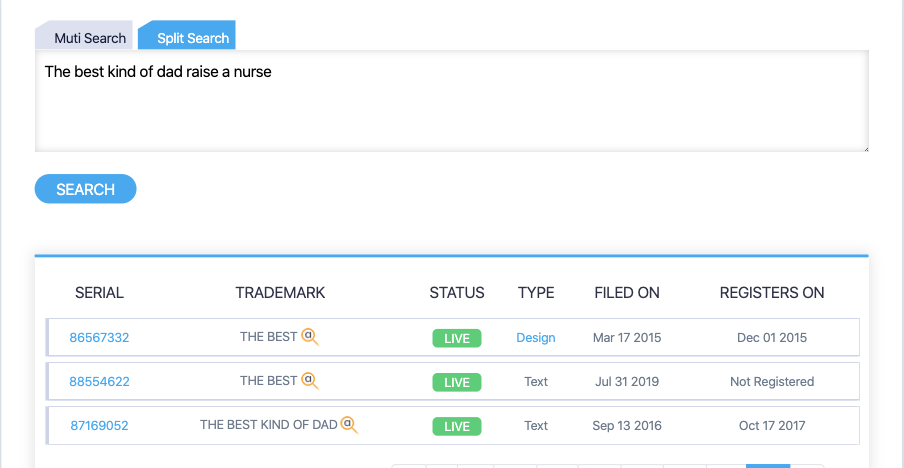
The interface is intentionally simple because speed matters in your upload workflow. You should be able to run a trademark check in under a minute before every single design you publish.
One important note: MerchIntel's trademark checker pulls from trademark databases, but the final responsibility always rests with you. Use it as your first line of defense, and when a result is ambiguous or the phrase is high-risk, treat that as a signal to dig deeper or simply choose a safer alternative.
Common Trademark Mistakes MBA Sellers Make
After seeing thousands of MBA accounts, a few patterns show up again and again in violation cases.
Chasing trending phrases without checking. When a phrase goes viral on social media, dozens of MBA sellers rush to upload designs featuring it. What they do not realize is that someone often files a trademark application the same week - or that the phrase was already registered months ago. By the time the takedown notices arrive, the seller has uploaded multiple variations of the same infringing design.
Using movie and TV references. Dialogue, character names, and even visual styles associated with popular films and shows are often protected. "But everyone uses it" is not a defense. Studios and entertainment companies have dedicated IP enforcement teams watching Amazon.
Event and sports names. Any major sporting event, championship title, or entertainment award show name is almost certainly trademarked. Even generic-seeming phrases associated with these events - like certain victory slogans - can be registered.
Brand names in keywords. Some sellers try to use competitor or brand names in their keyword fields to capture related search traffic. This is a textbook violation. Keywords are not a gray area - using trademarked brand names to drive traffic to your listing is infringement regardless of whether it appears in your design.
Assuming old means safe. A trademark registration from 2010 is still active if it has been maintained. Age does not expire trademark protection.
Pro Tips for Trademark Safety
Beyond running the basic check, here are habits that experienced MBA sellers use to stay clean.
Check before you design, not after. The worst time to discover a trademark issue is after you have invested time in artwork. Run the phrase check as part of your initial niche research, before committing to the design direction.
Check multiple variations. If you want to use "Camping Life," also check "Camp Life," "Camper Life," and "Life is Camping." Trademark holders often register clusters of similar phrases.
Use USPTO TESS as a secondary verification. The United States Patent and Trademark Office's Trademark Electronic Search System (TESS) is the authoritative source for US trademark registrations. MerchIntel gives you fast, MBA-workflow-friendly results, and TESS gives you the official record when you need absolute confirmation.
When in doubt, cut it out. If a search returns even one active registration in the apparel category, walk away. No design is worth an account strike. There are millions of profitable niches - you do not need to fight over a phrase that is already claimed.
Build a personal blacklist. Keep a simple document of phrases you have checked and flagged. Over time, this becomes a valuable reference that speeds up your research and prevents you from accidentally revisiting risky phrases.
Think like a brand, not a trend chaser. The sellers who build durable MBA incomes focus on evergreen niches and original phrases. Trend-chasing with trademarked content is a short-term play with long-term consequences.
Key Takeaways
- A single trademark violation can cost you your entire MBA account - the risk is not theoretical
- Trending phrases and pop culture references are the highest-risk categories for MBA sellers
- MerchIntel's trademark checker lets you run a compliance check in under a minute before every upload
- Always check the phrase, common variations, and related synonyms - not just the exact text
- Use MerchIntel as your first check and USPTO TESS for secondary verification on high-stakes phrases
- Build the habit of checking before you design, not after - it saves time and protects your income
Protecting your MBA account starts with one simple habit: check before you upload. MerchIntel's trademark tool is built to make that habit fast, painless, and part of your natural workflow. Start your 14-day free trial and run your first trademark check today - it takes less than a minute and could save your account.